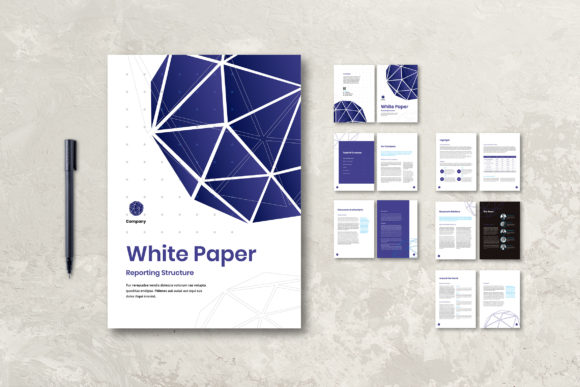
White Paper: The Professional Template for Polished Reports
In the world of business, your documents speak before you do. A cluttered, inconsistent report can undermine credibility, while a clean, professional presentation instantly builds trust. That's where a dedicated template like White Paper comes in. This isn't just another document; it's a structured framework designed to transform your business communications from mundane to memorable. Think of it as a suit for your data—tailored, sharp, and ready for any professional occasion.
More Than a Document: A Visual Identity System
White Paper is a professional and simple template built for clarity and impact. Its personality is one of confident minimalism. The layout favors ample white space, clear typographic hierarchy, and logical structure, guiding the reader's eye effortlessly from one section to the next. The style is modern yet timeless, avoiding fleeting design trends in favor of a classic, authoritative aesthetic. This visual approach conveys competence and attention to detail, which are invaluable traits for any brand or business. The overall appeal lies in its versatility—it provides a polished foundation that adapts to your content, not the other way around.
Its strength as a design asset is its full editability within Adobe InDesign. This means you have complete control to customize every element. Swap out placeholder text for your own copy, replace generic images with your team photos or product shots, and adjust the color palette to match your brand identity. You can modify charts and diagrams to reflect your specific data, ensuring every page is both informative and visually cohesive. The template includes 12 custom pages, a front cover, and a back cover, all sized to A4 (210×297 mm) with a 3mm bleed, making it print-ready at 300 DPI in CMYK. It even uses free fonts, removing a common barrier to implementation.
Where This Template Shines: Real-World Applications
The true value of a template like this is measured by its utility. Where does White Paper deliver the most impact?
- Information Books & Proposals: Create client-facing proposals or internal information guides that look like they were produced by a high-end editorial design studio. The structured layout helps present complex information in a digestible format.
- Magazines & Annual Reports: For small publishers or businesses producing annual reports, this template provides a premium font system and layout grid that elevates the content. It turns a financial summary into a compelling narrative about your company's year.
- Presentation Decks & Marketing Materials: Adapt the pages into slide decks or use them as a foundation for packaging design inserts or detailed brochure content. The consistent visual language ensures all your materials feel connected.
- Digital & Print Hybrid Projects: Because it's designed for print quality, exporting individual pages or sections for use in web design (like downloadable PDFs) or social media graphics (as image snippets) ensures your digital presence maintains the same professionalism as your printed materials.
Entrepreneurs, marketers, and content creators will find it particularly useful for establishing a consistent brand identity across all touchpoints. A blogger could use it to create a branded media kit or a series of premium PDF guides. A small business owner can produce a polished product catalog or a service booklet that stands up against larger competitors.
Making It Work for You: Practical Guidance
Adopting any new design asset requires a bit of strategy. Here’s how to evaluate and implement the White Paper template effectively.
Evaluate the Fit: Before diving in, assess if the template's clean, professional style aligns with your brand's voice. Is your brand more playful and casual, or authoritative and established? White Paper leans toward the latter. For projects requiring a more expressive script font or handwritten font aesthetic, this might serve as a complementary inner-page structure rather than the primary style.
Master the Customization: The template's power is unlocked through customization. Don't just drop in your logo. Use the color editing features to apply your exact brand colors to shapes and text. This is where you move from using a template to making it yours. Consider how you can use the provided layouts for different types of content—some pages are text-heavy, others are designed for visuals and data visualization.
Test the Readability: While the template uses a free font known for its clarity, always test your final content. Print a sample page or view it at 100% on screen. Check that your body text has comfortable line spacing (leading) and that headings create a clear visual hierarchy. The goal is seamless readability that keeps the audience engaged with your message, not distracted by the design.
Consider the Commercial Use: Since the template is fully editable, it's suitable for commercial projects. You can use it to create reports for clients, sell digital guides, or produce branded materials for your business. The key is that you are creating a unique end product using the template as a starting point, which is a standard practice in professional logo design and editorial design workflows.
Ultimately, White Paper is a tool for achieving consistency and professionalism. It solves the blank page problem, giving you a robust starting point that you can adapt endlessly. By investing a little time in customization, you can produce a suite of business documents that reinforce your brand, communicate with clarity, and engage your audience on a professional level. It’s not about the template itself, but about the credible, polished impression it helps you create.